AI GTM layer for your CRM and revenue stack

What Clay actually does (and how Flowbird uses it)

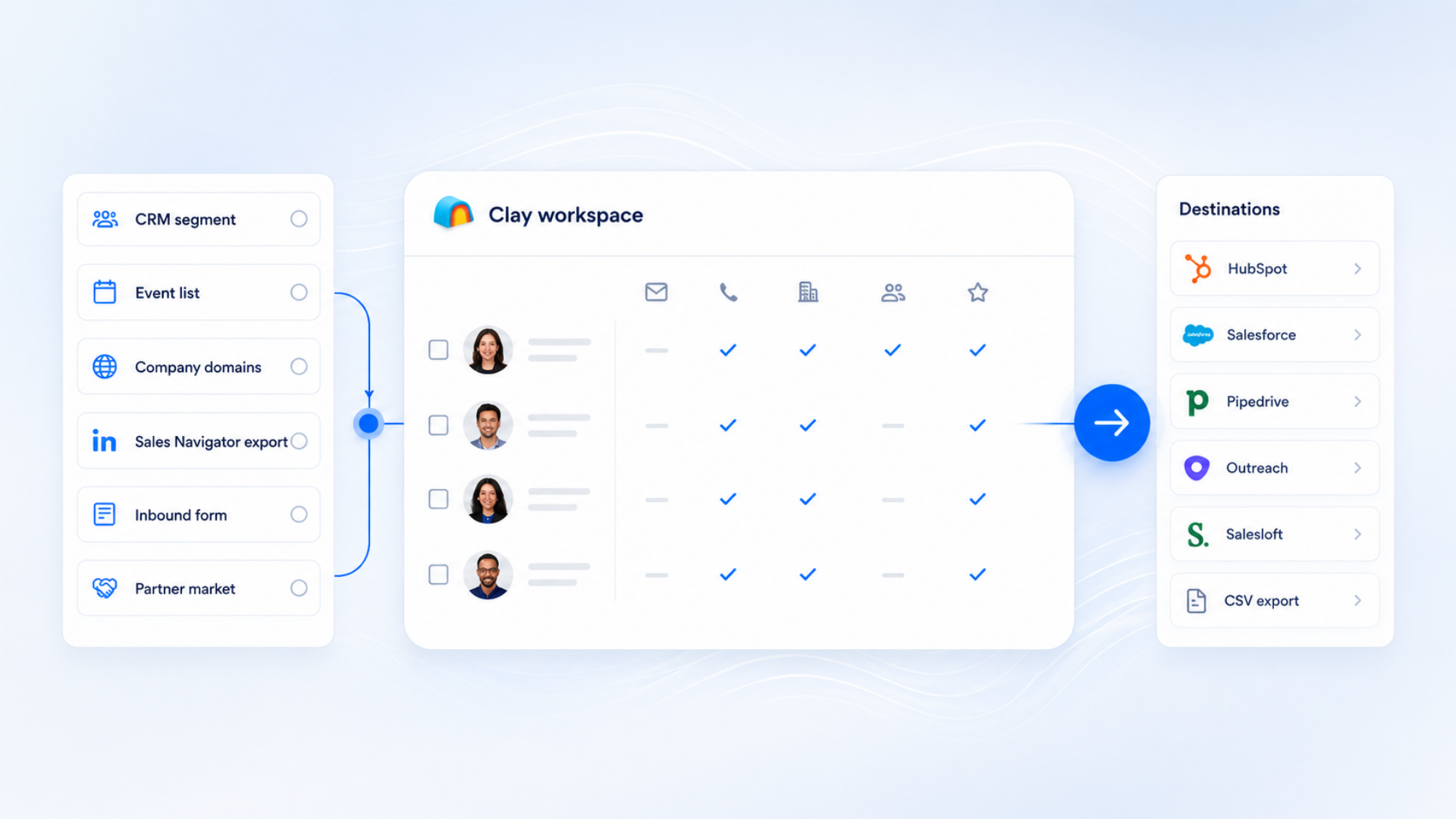
Clay acts as an AI-powered operational layer between your lead sources and your GTM tools. It enriches your data, researches prospects, scores accounts, identifies signals and feeds everything back into your CRM and outreach platforms. Flowbird turns this into a stable, joined-up Clay system that supports your revenue engine rather than sitting on the side.

Flowbird is a Clay consulting agency specialising in Clay automation setup, Clay GTM workflows, Clay CRM enrichment, Clay outbound orchestration and enterprise Clay implementation for teams using Pipedrive, HubSpot and Make.

  1. Data enrichment & CRM hygiene Always-on enrichment so your CRM stays accurate, deduplicated and usable.

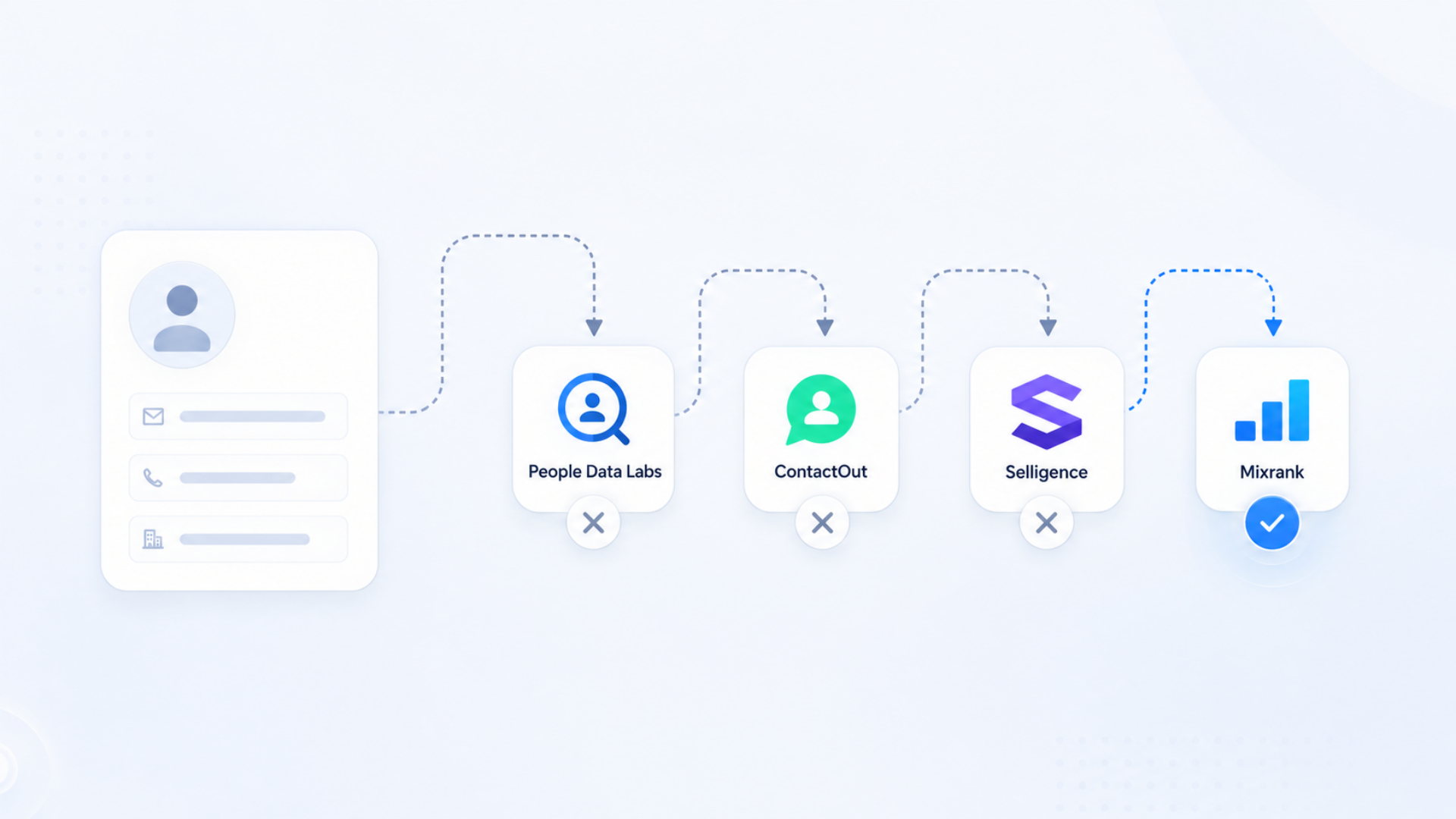
    Clay pulls from 100+ data providers to fill in emails, roles, firmographics, technographics, intent signals and job changes. Flowbird turns this into an always-on hygiene layer so your CRM stays accurate, deduplicated and usable for reporting and coaching.

  2. AI-powered research & personalisation Claygent research that makes outreach feel relevant, timely and human.

    Claygent runs targeted research on each account or contact, surfacing recent news, quotes, signals and context. Flowbird feeds this back into Pipedrive or HubSpot so outreach feels relevant, timely and human — without adding manual SDR research to every day.

  3. Triggered workflows & GTM automation Signals become action, not noise in another spreadsheet.

    Clay can act whenever something changes: job moves, funding events, inbound forms, website visits or list imports. Flowbird designs Clay workflows that route, score and update records automatically, so signals become action — not noise in another spreadsheet.

  4. 🎯 Smart audience building & outbound orchestration Continuously refreshed ICP and ABM audiences that plug into your workflows.

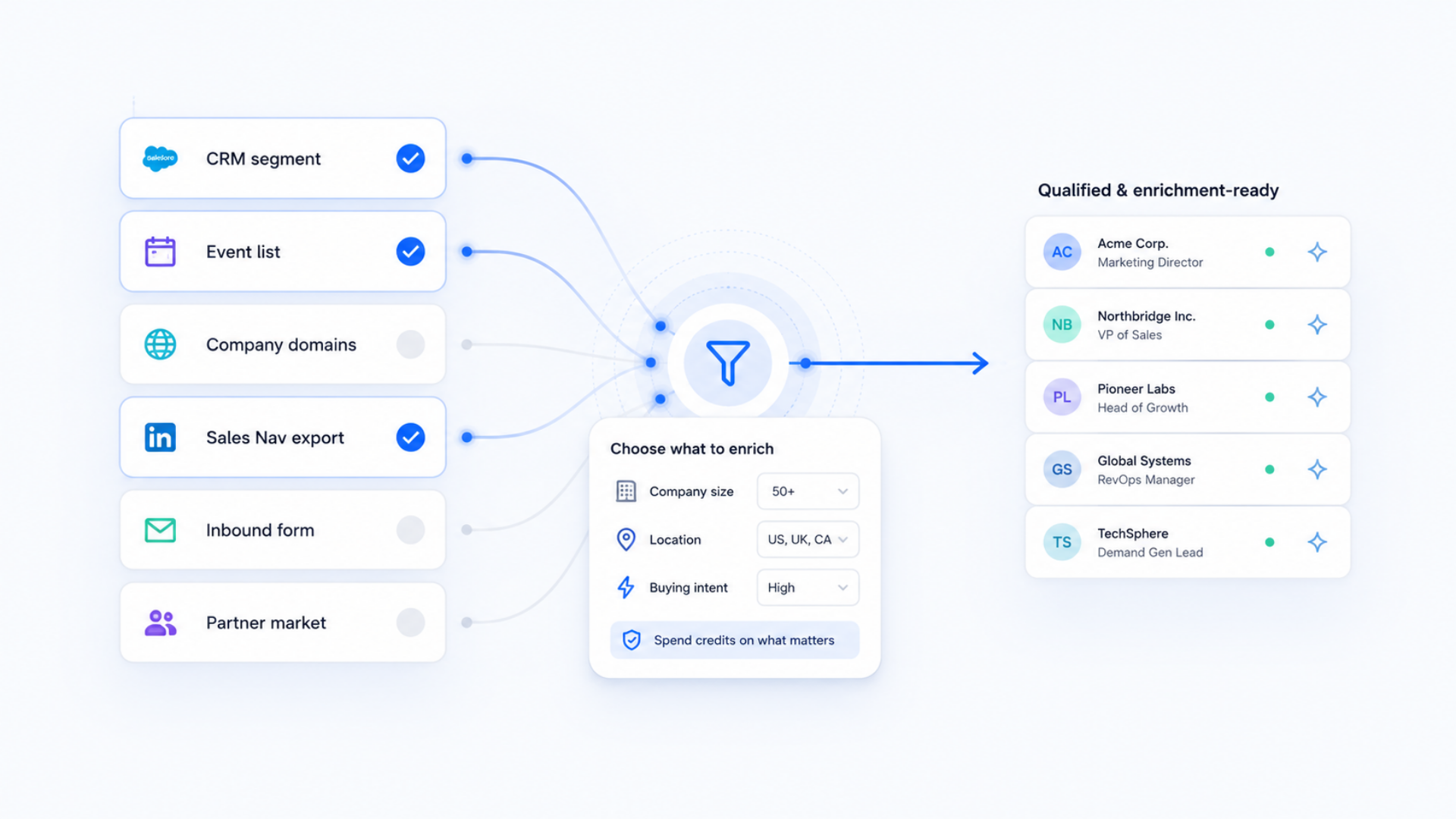
    Clay continuously builds and refreshes ICP lists, ABM targets and outbound audiences, then pushes them into your sequences and playbooks. Flowbird makes sure this plugs neatly into your existing Pipedrive or HubSpot workflows, sales engagement tools and SDR rhythm.

Clay does not replace your CRM or outreach tools. It strengthens them. We design Clay as part of your wider Pipedrive, HubSpot and Make ecosystem, so enrichment, research and GTM automation work together as one calm, reliable system.

Clay consulting, GTM automation and RevOps support

Flowbird Clay Services

We design, implement and run Clay as part of your wider GTM system. From discovery and architecture, through CRM enrichment and outbound, to training and managed Clay operations, each service is built around your Pipedrive, HubSpot and Make stack — not a generic Clay template.

  • We start with how you sell today: ICP, funnels, tech stack and bottlenecks.
  • Identify Clay’s role — enrichment engine, research layer, routing system, outbound accelerator or all of the above.
  • Define the Clay architecture that supports cleaner data, better handoffs and more predictable pipeline.
  • Give you a prioritised backlog of Clay workflows aligned to growth, efficiency and reporting.
  • Configure Clay workspaces, projects and columns around your GTM motion.
  • Connect Clay to Pipedrive, HubSpot and Make with safe, well-documented mappings.
  • Set up data provider strategy, Claygent prompts and standard column templates.
  • Put access, governance and error handling in place so Clay stays stable as usage grows.
  • Enrich every inbound lead before it reaches Pipedrive or HubSpot with firmographics, contact data and intent signals.
  • Prevent duplicates, standardise naming and keep key fields up to date without manual admin.
  • Refresh accounts and contacts regularly using Clay’s enrichment marketplace and Claygent.
  • Turn your CRM into a reliable source of truth for reporting, forecasting and coaching.
  • Use Clay to build precise outbound audiences based on your ICP, technographics and intent data.
  • Layer Claygent research to add relevant, human context to each contact or account at scale.
  • Push ready-to-use lists into your existing sequences, tasks and sales engagement tools.
  • Write results back into Clay and your CRM so outbound improves with every cohort.
  • Align Clay with your existing Pipedrive or HubSpot pipelines, fields and dashboards.
  • Use Make.com to orchestrate more complex flows where Clay is one part of a bigger automation.
  • Rationalise data providers and duplicate tooling where Clay can safely take over enrichment.
  • Keep reporting, handoffs and workflows coherent instead of scattering logic across tools.
  • Inbound Lead Firewall, ABM Account Universe Builder and Champion Movement Engine.
  • Event and webinar follow-up playbooks that enrich and segment attendees automatically.
  • Partner and channel intelligence to map ecosystems and uncover shared revenue opportunities.
  • Each playbook shipped with fields, logic, prompts and documentation your team can maintain.
  • Workshops for RevOps, SDRs and sales leaders on how to read and use Clay-enriched data.
  • Playbook-specific training on iterating prompts, filters and scoring logic safely.
  • Loom walkthroughs and internal documentation aligned to your real workflows.
  • Reduce dependency on external help while keeping a clear escalation path with Flowbird.
  • Ongoing monitoring, alerting and resolution when Clay workflows hit errors or edge cases.
  • Regular tuning of Claygent prompts, filters and data providers based on outcomes.
  • Quarterly Clay + CRM reviews to retire noisy logic and add new revenue experiments.
  • Clay evolves with your GTM strategy instead of becoming another abandoned project.

If you already use Clay or are exploring it for the first time, we can show you how it fits alongside your existing Pipedrive, HubSpot and Make setup, and whether a structured Clay implementation is the right next step for your GTM team.

Clay workflows running quietly in the background

Example Clay Workflows We Build

Clay becomes most valuable when it runs specific, repeatable workflows for your GTM team. These are some of the Clay workflows Flowbird designs and manages to keep your CRM clean, catch key signals and move revenue opportunities forward.

  1. 1

    Inbound Lead Firewall

    Clean, enrich, classify and route leads before they reach your CRM.

  2. 2

    Renewal Risk Signals

    Spot changes in headcount, usage or sentiment that indicate potential churn.

  3. 3

    Champion Movement Tracking

    Detect champion movement and create opportunities automatically.

  4. 4

    LTV Expansion Opportunities

    Identify accounts with strong fit and signals for expansion-focused outreach.

  5. 5

    Event & Webinar Enriched Follow-Up

    Enrich and segment attendee lists to drive meaningful outreach.

  6. 6

    Full ICP Account Generation

    Always-updated ICP accounts enriched from multiple sources.

  7. 7

    Content Download Enrichment

    Enrich and qualify content leads before assigning them to sales.

  8. 8

    Partner Market Mapping

    Use Claygent to map partner ecosystems and uncover revenue opportunities.

Clay implementation

The Flowbird Clay implementation process

Instead of disconnected Clay experiments, we follow a clear process that turns Clay into a calm, reliable GTM layer. We plug Clay into your CRM, outbound and RevOps stack — so enrichment, research and outbound workflows run quietly in the background while your team focuses on selling.

“Clay should feel like a quiet operations layer for your GTM team, not another tool they have to fight with.”

Flowbird Clay & GTM automation team

GTM-first architecture

We start from your existing motion in Pipedrive or HubSpot, then design Clay to route data, research and signals into the tools your team already lives in.

Calm, ongoing operations

We monitor, tune and document Clay workflows so they stay reliable as your GTM strategy evolves, instead of becoming another abandoned project.

How a Clay project runs with Flowbird

The Flowbird Clay implementation process

Instead of disconnected Clay experiments, we follow a clear process that turns Clay into a calm, reliable GTM layer. You end up with Clay joined to your CRM, outbound and RevOps stack — not another half-finished project in a separate tool.

  1. Diagnostic & GTM Mapping

    We start by understanding how revenue moves through your business today and where Clay will actually help.

    • Review your GTM motion across marketing, sales, CS and RevOps.
    • Map your tech stack, focusing on Pipedrive, HubSpot and Make connections.
    • Identify data gaps, manual work and missed signals Clay can solve.
    • Agree Clay’s first jobs: enrichment engine, research layer, routing logic or outbound accelerator.
  2. Architecture & Workflow Design

    We design how Clay will sit inside your system — not just the workflow steps, but the data model and governance behind them.

    • Define Clay workspaces, tables and column templates aligned to your CRM fields.
    • Design enrichment, scoring and routing logic that supports reporting instead of breaking it.
    • Plan Claygent prompts, data provider strategy and update cadence.
    • Prioritise a first wave of workflows that give quick, visible wins for your GTM team.
  3. Implementation & Integration

    We build the Clay workflows, connect them to your CRM and automations stack, and make sure everything runs safely end-to-end.

    • Set up Clay workspaces, views and governance for your GTM and RevOps users.
    • Connect Clay to Pipedrive and/or HubSpot with clear, documented mappings.
    • Use Make.com where needed to orchestrate multi-step flows and error handling.
    • Implement the first Clay workflows for enrichment, routing and outbound, with safe defaults.
  4. Testing & Training

    We run Clay with real data, refine the logic and train your team so they actually use the new workflows in their day-to-day.

    • Run Clay workflows against controlled cohorts of leads, accounts or events.
    • Monitor enrichment quality, routing outcomes and outbound performance.
    • Tune Claygent prompts, filters and provider mix based on results.
    • Deliver training for SDRs, sales leaders and RevOps on how to read and act on Clay output.
  5. Managed Ops or Handover

    Once Clay is stable, you decide how it should be run — we can stay close, or equip your team to own it.

    • Agree a run-book for ongoing Clay operations, monitoring and change requests.
    • Either Flowbird runs Clay as a managed service, or we hand over with documentation and guardrails.
    • Schedule regular Clay + CRM reviews to retire noisy logic and add new workflows.
    • Make sure Clay continues to support your GTM strategy instead of drifting into one-off experiments.

Clay services FAQs

Frequently asked questions about Clay, Clay workflows and working with Flowbird as your Clay partner

These questions cover how Clay works in practice, what changes when you work with Flowbird as your Clay agency and GTM automation partner, and how Clay connects to your existing CRM and RevOps stack. The answers are based on real projects where we have implemented Clay for enrichment, research, routing and outbound for modern revenue teams.

What is Clay and how does Flowbird actually use it for GTM automation?

Clay is an AI-powered GTM platform that connects to multiple data sources, enriches records, runs research via Claygent, and pushes structured data into your CRM and outbound tools. Flowbird uses Clay as an operational layer between your lead sources and your GTM stack: we build Clay workflows that enrich, score, route and segment contacts and accounts, then sync everything back into Pipedrive, HubSpot and Make so your team sees the benefit inside the systems they already live in.

Do I need a Clay subscription before working with Flowbird on Clay services?

You do not have to arrive with a perfect Clay setup. Some customers come to us with an existing Clay workspace that needs structure; others are exploring Clay for the first time. We can help you choose an appropriate Clay plan, design the initial architecture and then build out Clay workflows that align with your GTM strategy. Your Clay subscription is always held directly with Clay, while Flowbird provides Clay consulting, implementation and managed Clay operations around it.

Can you help us design Clay from scratch or take over an existing Clay workspace?

Yes. Flowbird can either design Clay from a blank canvas or tidy and extend what you already have. For new implementations we focus on Clay architecture, data model and first workflows that support enrichment, routing and outbound. For existing workspaces we audit your Clay boards, columns and Claygent prompts, remove unused experiments and rebuild Clay as a stable GTM layer that your RevOps team can understand and maintain.

How does Clay connect to Pipedrive, HubSpot and Make in a Flowbird project?

In most projects we connect Clay ↔ Pipedrive or Clay ↔ HubSpot directly, then use Make.com where orchestration and error handling need more control. We design clear field mappings, update rules and sync conditions so Clay enriches and updates records without creating duplicates or noisy data. The goal is simple: use Clay to strengthen your CRM and GTM reporting, not to create a second, conflicting source of truth.

What types of teams get the most value from Clay with Flowbird?

Clay is most valuable for GTM teams with defined motions but limited RevOps capacity. Typical examples include SaaS businesses, B2B service firms and revenue teams with SDRs, AEs and CS working from Pipedrive or HubSpot. If you care about cleaner data, better routing, more intelligent outbound and a calmer way to run GTM automation, you are likely a good fit for Flowbird Clay services.

Do you just build one-off Clay workflows or a full Clay GTM system?

We can help with a single high-impact workflow, but our preference is to design a joined-up Clay system. That usually includes an inbound lead firewall, key enrichment flows, champion movement tracking, ICP list generation and enriched follow-up for events and content. We ensure each Clay workflow supports your CRM fields, dashboards and outbound sequences so GTM automation feels coherent rather than piecemeal.

How do you keep data quality and compliance under control when using Clay?

We treat Clay data hygiene and governance as part of the project, not an afterthought. That means clear rules for when Clay can create or update records, strict duplicate handling, field standardisation and audit-friendly logging. We also align Clay behaviour with your existing data policies so enrichment, research and outbound activity respect your compliance requirements and regional regulations.

What happens if a Clay workflow fails or a data provider stops working?

In a managed Clay ops engagement, Flowbird monitors key workflows, error rates and provider behaviour. If a provider changes or a workflow fails, we adjust prompts, mappings or routing logic and update your documentation. When we hand Clay back to your team, we leave you with run-books and alerting so that Clay can be maintained calmly by RevOps instead of breaking silently in the background.

Can Flowbird train our team to manage Clay themselves instead of relying on an agency?

Yes. Alongside implementation we offer Clay training and enablement for RevOps, SDRs and sales leaders. That can include live workshops, Loom walkthroughs and internal documentation tailored to your Clay boards and GTM workflows. Many customers start with Flowbird managing Clay, then gradually bring more of the day-to-day Clay work in-house as their team becomes comfortable with the platform.

How do we get started with Clay services and Clay implementation at Flowbird?

The simplest first step is a short call to understand your GTM motion, current tech stack and where you think Clay could help. From there we suggest a starting point: that might be a Clay discovery & architecture project, a focused Clay workflow such as an inbound lead firewall, or a broader Clay + Pipedrive / HubSpot + Make implementation. You can start small and expand as your team sees the impact of Clay on real data, real outreach and real revenue.